

Computer scientist and programmer with years of experience in Technology and Video Games.
In a digital landscape where subscription fatigue is at an all-time high, the debate over LibreOffice vs. Microsoft 365 for professionals and businesses isn’t just about software features anymore—it’s about long-term sustainability. On one hand, Microsoft 365 remains an industry juggernaut, bolstered by seamless cloud collaboration and the power of Copilot. On the other hand, LibreOffice 26.2 proves that data sovereignty and open-source software can offer more robust Excel and Word interoperability than ever before, completely free of charge.
In this in-depth analysis, we break down whether Microsoft’s latest security updates and premium tools justify the rising monthly costs, or if the maturity of LibreOffice has finally made it the smarter choice for your budget and your privacy.
LibreOffice vs. Office 365: What do you really need?
Before getting bogged down in technical specs, let’s cut to the chase. Match your software choice to your actual workflow:
- Do you want a one-time install, zero subscription fees, and no strings attached? LibreOffice is your best bet.
- Do you work in teams, edit documents simultaneously, and rely on cloud syncing? Stick with Microsoft 365.
- Are you trying to breathe new life into an aging, low-spec laptop? Download LibreOffice.
- Does the fear of a .docx file formatting error when sending it to a client keep you up at night? Pay for Microsoft 365.
My experience and user feedback
I’ve spent weeks testing the latest updates, including LibreOffice 26 and the Microsoft 365 Copilot ecosystem. I’ve also dived deep into Reddit threads where users debate whether leaving Windows is worth the loss of Excel.
To be direct: based on extensive user feedback and my own daily usage, Microsoft Office remains the superior all-around option.
Why? Because it dominates the market, which translates to a massive advantage in compatibility and third-party support. The suite is incredibly polished, the learning curve is minimal, and the interface is intuitive.
If you have spent your life using Word or Excel, your first few days with LibreOffice might feel like driving a car with the steering wheel on the wrong side. It gets you to your destination, but you will find yourself searching for buttons and moving at a slower pace.
Technical Comparison
While both are powerful office suites, Microsoft 365 and LibreOffice excel in different areas. Here is how they stack up.
1. Interface and Usability
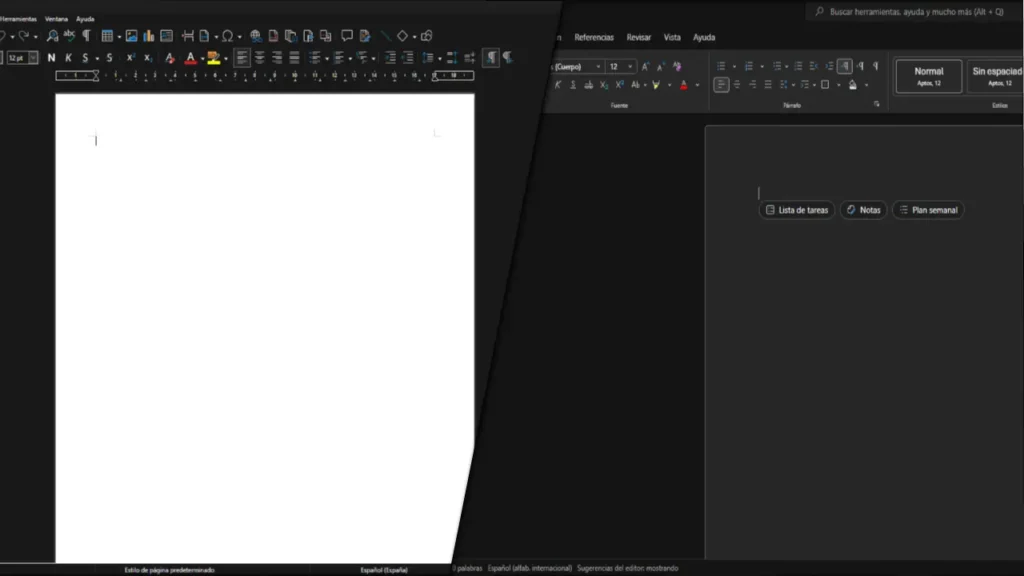
Microsoft revolutionized productivity design with its ribbon interface. Everything is exactly where your brain expects it to be.
LibreOffice defaults to a more traditional, classic aesthetic. Open-source purists love the clean, minimalist look. However, power users may find themselves hunting through drop-down menus for specific design functions that are buried deeper than they are in Microsoft’s suite.
2. File Compatibility
This is the ultimate deal-breaker in most offices.
Microsoft is the industry standard. A .docx or .xlsx file created in 365 is guaranteed to look pixel-perfect on any other machine using Microsoft Office.
LibreOffice has made massive strides, but it still struggles with complex macros, heavily nested tables, or proprietary design formatting. If your workflow involves intricate templates, expect the occasional formatting headache.
3. Excel vs. Calc: The Data Duel
For household budgets or simple invoices, LibreOffice Calc is more than enough. It’s fast, efficient, and capable.
However, for data analysts using Power Pivot, Power Query, or massive datasets with hundreds of thousands of rows, Microsoft Excel is a beast. Calc can experience latency with heavy files that Excel handles effortlessly.
4. Cloud, Privacy, and Performance
Office 365 is a cloud-first ecosystem. Save to OneDrive, edit on your mobile while commuting, and have your team update the file in real-time. It is essential for modern high-paced workflows.
LibreOffice is pure desktop software. It offers complete privacy—no cloud scanning and no telemetry data collection to train AI. Plus, because it lacks heavy background processes, it is significantly lighter on system RAM.
5. Pricing
- Microsoft 365: Requires a monthly or annual subscription. It includes 1TB of cloud storage and always-current features. You can also explore free online versions of Microsoft 365.
- LibreOffice: $0. Free today, free tomorrow, and free in a decade. It is pure open-source software maintained by a global community.
The Verdict: Which one should you choose?
There is no single winner—only the right choice for your specific needs.
Stick with Microsoft Office 365 if:
- You frequently share files with clients, universities, or corporate partners.
- You are a power user of Excel (macros, Power Query, pivot tables).
- You value a modern, intuitive interface that prioritizes time-saving features.
- You need seamless cross-device synchronization.
Switch to LibreOffice if:
- Your budget is tight and you reject the subscription economy.
- You only need standard word processing, basic presentations, and simple spreadsheets.
- You demand absolute privacy for your local documents.
- You are running older hardware that requires lightweight software.
Making the decision is simple once you identify your priorities. Do you value convenience and professional reliability above all else, or does financial and digital independence outweigh the need for a slight learning curve? The choice is at your fingertips.